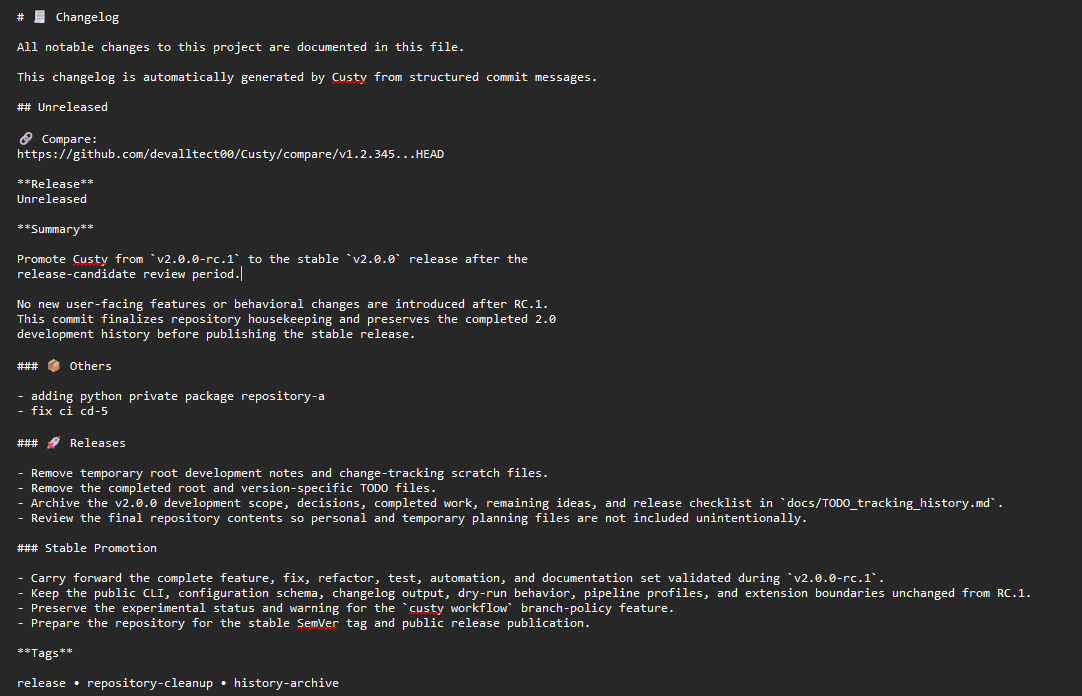
Output
Command Output
Understand the generated CHANGELOG.md structure and the checks required before committing it.
custy changelog generateCategory
Quick Command
custy changelog generateOverview
The primary artifact is CHANGELOG.md. Its exact structure depends on available
history, release boundaries, templates, and render configuration.
Console Progress
Custy displays a determinate Rich progress bar while collecting changelog
history. The total contains one unit for Example output produced after running the command. Representative progress for a repository with two tags.Unreleased and one unit for every
discovered Git tag. The visible description changes from Processing Unreleased changes to Processing release TAG as each range is collected.Command Output
History Collection
Processing Unreleased changes   ━━━━━━━━━━━━━ 1/3
Processing release v2.0.0-rc.1 ━━━━━━━━━━━━━ 2/3
Generating changelog ✔ ━━━━━━━━━━━━━ 3/3Changelog generation progress

Representative Structure
Command Output
Example output produced after running the command.
Generated Changelog
A representative outline; actual headings and groups follow project configuration.# Changelog
## v1.4.0 - 2026-08-12
### Features
- Add structured release metadata
### Bug Fixes
- Preserve configured changelog grouping
Possible Content
Depending on configuration and available history, the file can contain:
- A changelog title and description.
- Releases ordered by version and date.
- Release status, summary, metadata, and promoted pre-releases.
- Comparison and release links.
- Commit groups such as features, fixes, performance, documentation, or tests.
- Optional scope subsections.
- Contributors, statistics, tags, breaking changes, and footer content.
Generated File Preview
Generated changelog