Output
Output
Learn how Custy reports the results of a Branch Cleanup operation.
custy cleanup branchesCategory
Quick Command
custy cleanup branchesOverview
After evaluating every configured cleanup rule, Custy reports the outcome of the cleanup operation.
Depending on the repository state and your configuration, the command may remove one or more branches, skip cleanup entirely, or report that no eligible branches were found.
Command Output
Example output produced after running the command.
Successful Branch Cleanup
Eligible branches were successfully removed.🧹 Cleaning Git branches...
✓ Evaluating configured cleanup rules...
✓ Removing eligible branches...
✓ Branch cleanup completed successfully.
Branch Cleanup Output
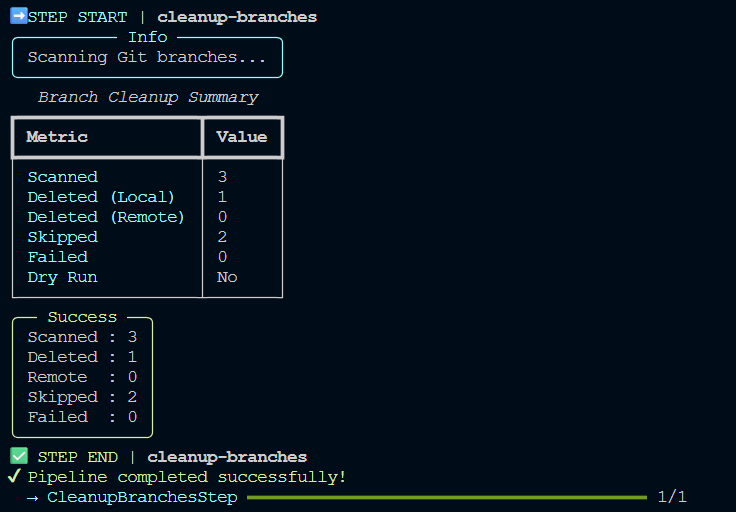
Successful Cleanup
When one or more branches satisfy every configured cleanup rule, Custy removes those branches and displays a summary of the completed operation.
Protected branches remain untouched regardless of the configured filters.
No Matching Branches
If no branches satisfy the configured cleanup rules, Custy completes normally without removing any branches.
This indicates that no branch matched the configured filters rather than a failure of the command.
Dry Run Output
When using the global --dry-run option, Custy evaluates every configured
cleanup rule but does not delete any branches.
The reported output allows you to verify the cleanup behavior before modifying your repository.
Workflow Execution
Branch Cleanup is executed publicly with custy cleanup branches. Its internal
profile name is not accepted by the current public Run argument.
What's Next?
If Branch Cleanup does not behave as expected, continue to the Troubleshooting page to learn about common configuration issues and safety mechanisms.