Branch Cleanup Troubleshooting
Branch Cleanup Troubleshooting
Resolve common issues encountered while cleaning Git branches.
custy cleanup branchesCategory
Quick Command
custy cleanup branchesOverview
Most Branch Cleanup issues are related to project configuration rather than the command itself.
In many cases, Custy intentionally skips branch removal because the configured cleanup rules do not allow any branches to become eligible.
No Branches Were Removed
What you see
Branch Cleanup completed successfully, but no branches were deleted.
Why it happens
- No branches matched the configured prefixes.
- No branches satisfied the configured merge status.
- Age filters excluded every branch.
- Only protected branches matched the configured filters.
How to resolve it
Review your cleanup configuration and verify that at least one branch is eligible for cleanup.
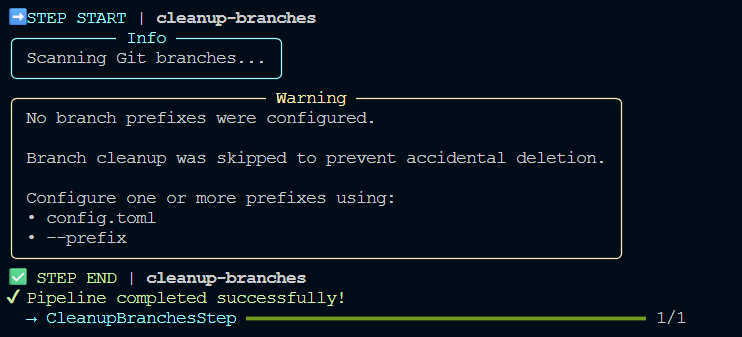
Branch Cleanup Was Skipped
What you see
Custy reports that no branch prefixes were configured.
Why it happens
Your project currently uses:
include_prefixes = []
Without configured prefixes, Custy intentionally skips Branch Cleanup to prevent accidental deletion.
How to resolve it
Configure one or more branch prefixes.
For example:
include_prefixes = [
    "release/",
]
Safe Default Behavior
Expected Branch Was Not Deleted
What you see
A branch you expected to be removed still exists.
Why it happens
- The branch does not match the configured prefixes.
- The branch is newer than the configured age filter.
- The branch is not merged.
- The branch is protected.
How to resolve it
Review every configured cleanup filter.
A branch must satisfy every applicable rule before Custy considers it eligible for removal.
Protected Branch Was Not Removed
What you see
Protected branches such as:
mainmasterdevelop
remain after cleanup.
Why it happens
Custy permanently protects these branches.
How to resolve it
No action is required.
If you intentionally want to remove one of these branches, use Git directly rather than Custy.
Dry Run Didn't Delete Anything
What you see
No branches were removed.
Why it happens
The command was executed using:
custy --dry-run cleanup branches
How to resolve it
Run the command again without the global --dry-run option when you're ready
to perform the cleanup.
Next Diagnostic Step
If Branch Cleanup continues to behave unexpectedly:
- review your
config.toml, - inspect the command output,
- verify the selected cleanup rules,
- confirm that at least one branch satisfies every configured filter.
Most Branch Cleanup issues are resolved by adjusting the project configuration rather than modifying the command itself.