Workflow
Workflow
Advanced
Understand how Custy evaluates configured cleanup rules before removing Git branches.
Command
custy cleanup branchesCategory
Maintenance
Quick Command
custy cleanup branchesOverview
Branch Cleanup follows a multi-stage evaluation process before deleting any Git branches.
Rather than deleting branches immediately, Custy progressively filters the available branches until only eligible candidates remain.
This layered approach helps minimize the risk of accidental branch removal.
Branch Cleanup Workflow
High-level execution sequence.
1
Load Configuration
Resolve cleanup rules from command-line options, project configuration, and built-in defaults.
2
Inspect Repository
Retrieve local Git branches and collect metadata used during cleanup.
3
Apply Cleanup Filters
Evaluate branch prefixes, merge status, age filters, and protected branch rules.
4
Remove Eligible Branches
Delete only branches that satisfy every configured cleanup rule.
5
Display Summary
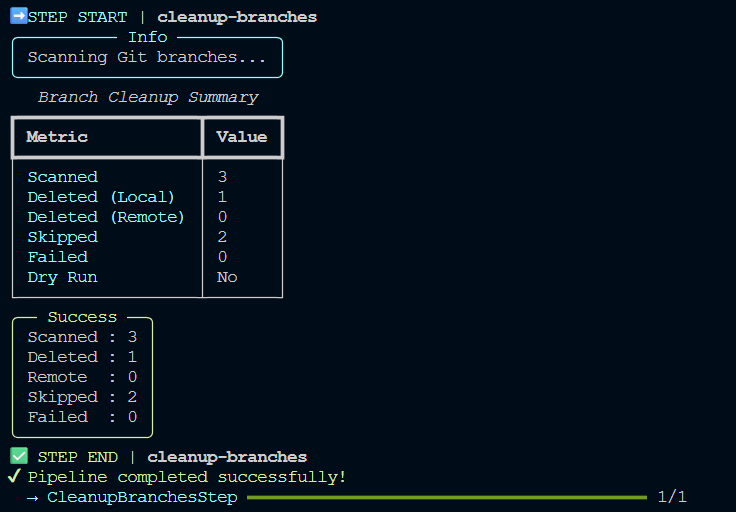
Present the cleanup results and any skipped branches.
Workflow Stages
1. Resolve Cleanup Configuration
2. Inspect Local Branches
3. Apply Cleanup Rules
4. Remove Eligible Branches
5. Report Results
Before Cleanup
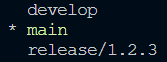
Cleanup Execution
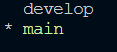
After Cleanup
Filtering Pipeline
Conceptually, every branch passes through the following evaluation stages:
- Prefix filter
- Merge status filter
- Age filter (if configured)
- Protected branch check
Only branches that successfully pass every stage are eligible for deletion.
What's Next?
Continue to the Examples page to see common Branch Cleanup scenarios and recommended configurations.